
Download the Quick Start Guide
1.1 Payload Installation
Mount the Shield Payload to the Lucid Bots Sherpa 1.5 using the steps below. Ensure the drone is powered off and on a stable, level surface before beginning installation.
- Power off the Sherpa 1.5 and place it on a flat, stable surface.
- Using the provided M5 handnuts, install the front and rear fasteners onto the drone frame, leaving the middle fasteners off for now.
- With the payload oriented so the valve assembly faces the underside of the drone body and the supply hose faces toward the rear, align the front slots of the payload baseplate onto the front fasteners. Slide the payload all the way forward, then align the rear slots onto the rear fasteners.
- Install the middle fasteners and tighten all six handnuts until the payload is secured. There should be no movement when gently pushing or pulling on the payload.
1.2 Payload Installation — Lance
- Pass the lance base through the tube brackets until it is fully seated in the rear bracket. Secure the lance in the front bracket using the tethered clevis pin and hairpin. Close the front two cam locks together, followed by the rear cam lock. The lance should feel secure within the brackets. If it does not, tighten the cam lock fasteners as needed.
- Slide the tip carrier onto the end of the lance, securing it with the M3 clevis pin and hairpin. Clamp the lance tube by tightening the cam lock.
- Install the tube segment between the valve and tip carrier, securing the middle portion to the lance with the TPU straps.
1.3 Pump Connection
The ground-based pump pressurizes the sealant mixture and sends the fluid up the supply hose to the drone. The pump should be capable of 130–160 PSI at a flow rate of 1.8 GPM.
- Mix the sealer as directed by the Technical Data Sheet (TDS) of the manufacturer. Store in a tank or reservoir that the pump inlet line can be dropped into.
- Place an inlet line with filter into the fluid tank and connect to the inlet of the pump.
- Connect the Flexzilla hose (or equivalent hose) to the outlet of the relief valve and the 1/4" quick-disconnect side to the drone payload.
1.4 Collision Prevention
Because sealing operations often take place in close proximity to structures, configuring collision prevention settings in the Sherpa 1.5 controller is a critical step before every job. Proper setup helps protect both the drone and surrounding surfaces.
- Power on the Sherpa 1.5 as well as the controller.
- Upon connection of the controller to the drone, activate advanced mode by pressing the upper left-hand corner of the screen repeatedly. When prompted, select Switch to Advanced.
- In Advanced > Parameters, type "CP" to search collision prevention parameters. Set CP_ON_DIST to 2.13 m (7 ft). Once changed, the parameter should appear red to indicate a new value has been written.
- Also set CP_BRAKE_DIST to 2.1 m. It should also appear red once the new value is written.
- Clear the "CP" from the search bar so the Tools button appears. Press Tools and then select Reboot Vehicle from the menu that appears.
2.1 Operation
The Shield Payload is designed to maintain a constant flow rate at the nozzle as the drone flies to the various altitudes required by an application. It achieves this through the use of an onboard pressure regulator. The regulator allows the pump to overpressure the supply line to overcome hydrostatic pressure loss, while holding the pressure at the payload nozzle constant. Though many repellants require approximately 40 PSI, various repellants may require different pressures. The onboard regulator can be adjusted between 0–125 PSI.
2.2 Setting the Fluid Pressure
Set the pressure using the following process:
- Loosen the pressure set nut at the base of the adjustment knob.
- Increase the pressure with a clockwise rotation toward the plus symbol. Alternatively, decrease the pressure with a counter-clockwise rotation toward the minus symbol. Use the pressure gauge to view the current pressure, but note that fluid must be actively flowing for the pressure to be set correctly.
- Once the desired pressure is achieved, tighten the pressure set nut to ensure the adjustment knob cannot turn under vibration loads during flight.
2.3 Setting the Fluid Flow Rate via Nozzle Selection
The standard nozzle kit provides five different nozzle offerings with various flow rates. The flow versus pressure characteristics of each nozzle are shown in the graph below. The higher the flow rate, the faster the drone can be flown to cover a given area. However, a higher fluid discharge can also mean less precise application. The exact nozzle selection is left to the preference of the user.
Available nozzles and patters: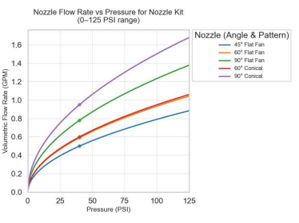
- 45° Flat Fan
- 60° Flat Fan
- 90° Flat Fan
- 60° Conical
- 90° Conical
2.4 In-Flight Control
The ground-based pump pressurizes the chemical mixture and sends the fluid up the supply hose to the drone. The pump should be capable of 130–160 PSI at a flow rate of 1.8 GPM. The pump requires a relief valve on the output side that will direct fluid back into the tank in the event of an overpressure.
-
Fluid Flow On/Off: Uses the standard Spray control lever on the right side of the Sherpa 1.5 controller.
-
Relative Position: The ideal nozzle distance for most applications is 2–3 ft from the facade. It is also important to remain relatively perpendicular to the wall in the yaw axis.
-
Collision Prevention: When configured for close proximity to structures as covered in Section 1.4, the nozzle can be controlled in position mode to a distance of 2–3 ft from the structure. Note that step changes in the surface of the facade should be monitored carefully, as larger steps can lead to a sudden loss of positive translational movement in the forward (+X) direction.
3.1 Clean-Up & Maintenance
After each use, the payload system must be flushed to prevent chemical from curing inside the hoses, pump, regulator, or nozzle. Failure to flush the system promptly after use may result in blocked components and reduced service life.
3.2 System Flush
- After completing the application, turn off the pump and relieve any remaining line pressure before disconnecting any fittings.
- Replace the chemical supply with clean water, or a cleaning agent recommended by the Technical Data Sheet (TDS) of the sealer in use.
- Run the pump and activate the spray to flush the cleaning fluid through the entire system — from the inlet line, through the pump, regulator, hose, lance, and out through the nozzle — until the discharge runs clear.
- Turn off the pump and relieve line pressure. Disconnect the supply hose from the payload and allow any remaining fluid to drain.
- Wipe down the exterior of the payload, lance, and tip carrier with a clean cloth to remove any residual chemical or overspray.
Note on Cleaning Agent: Always refer to the TDS of the specific chemical in use for the manufacturer's recommended cleaning agent and procedure. Some products may require a solvent-based cleaner rather than water. Follow all handling and disposal instructions for the cleaning agent as specified in its SDS.